HTML 7

Jun 10, 2012 Posted by Lara Kannan 0 comments

HTML 5

We are in HTML5. In simple language, HTML5 , tried to make web browser to view the content like video, audio … , offline web application, geolocation , etc without any 3rd party application. To describe more about it, an INFOGRAPHICS can help be more understandable .


A Sample Video about HTML5 , Many other videos seemed to be more than 40 mins


HTML 7

HTML5 didn’t live up to all that. Its APIs were diverse and technically sound but wildly insufficient for the real world.

And so we have deliberated thusly: a new wonder of technical achievement is born from the wreckage of misused technical initialisms: HTML7.

What does it do?

Well, by embedding a webkit instance in every consumer product we have created a truly ubiquitous API. So, you can now control the following devices via HTML7′s new DOM interface:

  • Your lawnmower

  • Your microwave

  • Your TV

  • Your alarm system

  • Your space shuttle

  • Your protoss mothership

Welcome to the truly abstracted universe… where even WebKit is run in an instance of WebKit! >

Source : http://james.padolsey.com/ & http://sivaganesh.com/ >

Hope this post will help you!

Share
Labels: ,

Different ways to refresh or reload page using jQuery

Nov 28, 2011 Posted by Lara Kannan 0 comments
In this post, I will show you the different ways using which you can reload or refresh the webpage using jQuery. The first method is nothing to do with jQuery. It is a HTML tag which you need to put in the head section of your page and your page will get refreshed automatically after specified interval.

<meta http-equiv="refresh" content="10">

The meta tag with "http-equiv" is used to refresh the page. This attribute tells the browser that this meta tag is sending an HTTP command rather than a standard meta tag.

Refresh is an actual HTTP header used by the web server.The content attribute in the tag is having value in seconds. As per the above code, it is set to 10, which means after 10 seconds your page will get refreshed or reloaded.

You can also use jQuery to refresh/reload the page automatically. See below jQuery code.
function ReloadPage() { 
   location.reload();
};
 
$(document).ready(function() {
  setTimeout("ReloadPage()", 10000); .
});
location.reload() will reload the page again. The advantage of location.reload() is that it works with all the major browsers.

If you want to reload the page on click of button, then you can call location.reload() on button click event. See below jQuery code.
$(document).ready(function() {
     $('#btnReload').click(function() {
             location.reload();
       });
}); 

Hope this post will help you!

Share

Creating Your Own jQuery Custom Selector

Posted by Lara Kannan 1 comments
jQuery supports a large subset of selectors defined by the CSS3 Selectors draft standard. Additionally it also contains some very useful pseudo classes (similar to :first-child, :hover etc).

Due to its extensible framework, the best part is that jQuery lets you create and define your own custom selectors with ease. A full list of jQuery selectors is available on the jQuery site.

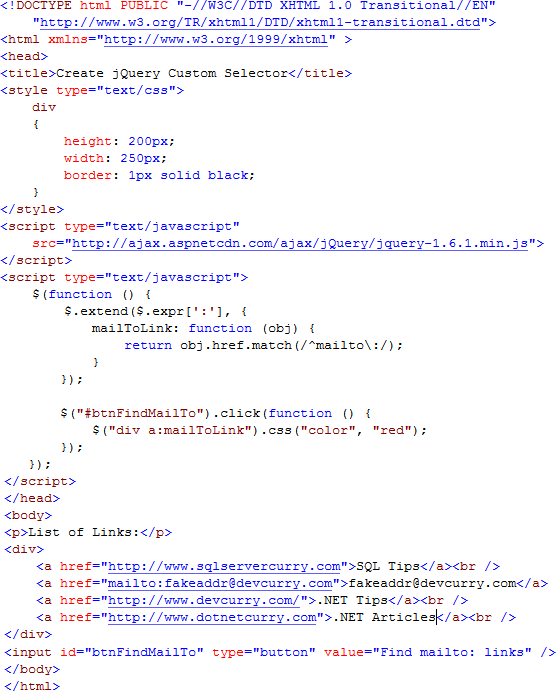
In this article, we will learn how to create our own custom selector that identifies all the mailto: links on a page. Let us see some code first:


As you can observe, we have extended jQuery’s selector expressions under the jQuery.expr[':'] object. To learn more about this, visit the jQuery hot Selector engine called sizzle. We have defined a custom selector called :mailToLink to which we are passing an object, which is a collection of links. This selector looks for all anchor elements that contains an href attribute matching mailto.

That’s it. Our selector :mailToLink is ready and here’s how we can use it:

To test this selector, we have used some hyperlinks, out of which one of them is a mailto: link. When you click the button, we use our custom selector to indentify the :mailto link and set it’s color to red.

As you can see, we have extended jQuery’s expression engine with ease!

The entire source code of this article can be downloaded over here. I hope you liked the article and I thank you for viewing it.

Source: www.dotnetcurry.com


Hope this post will help you!

Share