Showing posts with label SQL SERVER. Show all posts

What a "GO" statement do in T-SQL ?

Sep 13, 2011 Posted by Lara Kannan 0 comments
What a "GO" statement do in T-SQL ?

By definition it is a batch separator. It will run a batch and commit it. But along with that it also accepts one parameter which tells the SQL engine basically how many times to do the job.

For Example:
SELECT * FROM   sys.objects;
GO 3
It will show the output THREE times :)

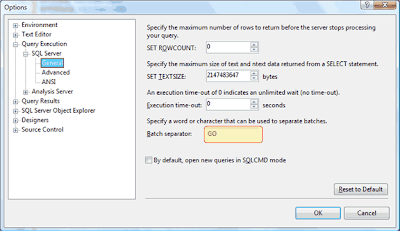
Note: "GO" is the keyword used by SSMS to separate query batches. It can be configured in this location:

Tools » Options » Query Execution » SQL Server » General. Change the value for "Batch Separator:" in the right pane.

To see the immediate effect of this change, you need to close all query windows in the current session and open new query window.

Next Example:

IF EXISTS (SELECT 1
FROM tempdb.sys.objects
WHERE name LIKE '%#ProductTable%')
DROP TABLE #ProductTable;

CREATE TABLE #ProductTable
(
ID INT IDENTITY (1, 1),
Name VARCHAR (50)
);
GO

INSERT INTO #ProductTable (Name) VALUES ('Office XP');
GO 3

SELECT * FROM #ProductTable;

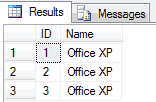
OUTPUT:

Hope this helps you and thanks to SQLLion.

Share

Common Table Expressions (CTEs)

Jan 11, 2011 Posted by Lara Kannan 0 comments
Common Table Expressions (CTEs)

Why we need CTEs ?

You need to implement recursive queries to retrieve data which is presented in a hierarchical format. We normally resort to implementing views, cursors or derived tables and perform queries against them. The problem arises when the hierarchy level increases as SQL Server is limited to 32 levels of recursion.

We need a better way to implement recursive queries in SQL Server 2005 / 08. How do we do it? Use CTE.

Common Table Expressions (CTEs) are one of the most exciting features to be introduced with SQL Server 2005. CTEs come in 2 forms, non-recursive and recursive

A CTE is a "temporary result set" that exists only within the scope of a single SQL statement. It allows access to functionality within that single SQL statement that was previously only available through use of functions, temp tables, cursors, and so on.

CTE can be used for both selects and DML statements. CTEs can also contain references to themselves. CTEs can also be used in place of views.

You can also use a query hint to stop a statement after a defined number of loops. This can stop a CTE from going into an infinite loop on a poorly coded statement. You do this by including the MAXRECURSION keyword in the SELECT query referring to the CTE.

1. Non-Recursive CTE

Non-Recursive CTE as a derived table, or a temporary view.

The concept behind a CTE is simplicity itself. Consider the following statement:
with MyCTE(x)
as
(select x = 'Kannan')

select x from MyCTE

In brackets after the 'as' keyword is the query that defines the CTE and it simply returning the string "Kannan".


2. Recursive CTE

To print the numbers 5 to 10 using SQL. How ? Before we go to actual code, let we see the syntex of it.

Syntex
WITH cte_alias (column_aliases) 
AS
(
cte_query_definition --initialization
UNION ALL
cte_query_definition2 --recursive execution
)
SELECT * FROM cte_alias

The table defined in the CTE can be referenced in the CTE itself to give a recursive expression, using union all.
DECLARE @Start INT
DECLARE @End INT
SET @Start = 5;
SET @End = 10;

WITH CTE AS
(SELECT @Start AS NUM
UNION ALL
SELECT NUM + 1 FROM CTE WHERE NUM < @End
)

SELECT * FROM CTE

The query:
SELECT @Start AS NUM

is called the anchor member. This is executed in the first pass and will populate the CTE with the result, in this case 5. This initial CTE is repeatedly executed until the complete result set is returned. The next entry:
SELECT NUM + 1 FROM CTE WHERE NUM < @End

is a recursive member as it references the CTE, CTE. The recursive member is executed with the anchor member output to give 6. The next pass takes 6 as input and returns 7, and so on so that we arrive at a CTE populated with rows as follows:
5
6
7
8
9
10

The recursion will terminate when the recursive member produces no rows – in this case recursion stops when the length of x equals 10.


Note:
Note the ";" before the CTE definition – that's just a syntax requirement if the CTE declaration is not the first statement in a batch.

Disadvantage :

1. CTE will be available with the scope of the statement or block of code.
2. Compute, Order By (without a TOP), INTO, Option, FOR XML, and FOR BROWSE are all not allowed.

Hope this will help you. If so please add your comments. Thanks.

Share

List all stored procedure created / modified in N days

Jun 28, 2010 Posted by Lara Kannan 0 comments
Following script will provide name of all the stored procedure which were CREATED in last 7 days, they may or may not be modified after that.

SELECT name
FROM sys.objects
WHERE type = 'P'
AND DATEDIFF(D,create_date, GETDATE()) < 7
----Change 7 to any other day value.

Following script will provide name of all the stored procedure which were MODIFIED in last 7 days, they may or may not be modified after that.

SELECT name
FROM sys.objects
WHERE type = 'P'
AND DATEDIFF(D,modify_date, GETDATE()) < 7
----Change 7 to any other day value

Source : http://blog.sqlauthority.com/

Hope this script will help you.

Share

Free ebook - Microsoft SQL Server Reporting Services Recipes

Apr 9, 2010 Posted by Lara Kannan 1 comments
Microsoft SQL Server Reporting Services Recipes: for Designing Expert Reports

While most users of SQL Server Reporting Services are now comfortable designing and building simple reports, business today demands increasingly complex reporting. In this book, top Reporting Services design experts have contributed step-by-step recipes for creating various types of reports.

Written by well-known SQL Server Reporting Services experts, this book gives you the tools to meet your clients’ needs. SQL Server Reporting Services enables you to create a wide variety of reports


Product Details

  • Paperback: 648 pages
  • Wrox (April 5, 2010)
  • Language: English
  • ISBN-10: 0470563117
  • ISBN-13: 978-0470563113

Free Download Links :

1. Hotfile Link
http://hotfile.com/...Reporting.Services.Recipes.Mar.2010.rar.html

2. Rapidshare Link
http://rapidshare.com/.../sqlseverreport.rar

3. Uploading Link
http://uploading.com/files/ef7aee72/sqlseverreport.rar/

If you like this post, please add your comments and 'A thanks' would be nice.

Thanks : ebookw.net

Share

Free ebook - Essential SQL on SQL Server 2008

Apr 7, 2010 Posted by Lara Kannan 0 comments
Dr. Sikha Bagui, Dr. Richard Earp, "Essential SQL on SQL Server 2008"

This book, written for readers who have little or no previous experience with databases, SQL, or SQL Server, provides a very systematic approach to learning SQL (Structured Query Language) using SQL Server.

Each chapter is written in a step-by-step manner and has examples that can be run using SQL Server. Using the sample tables and data provided, the reader of this book will be able to do all the examples to experience hands-on SQL programming in SQL Server. The text also presents a series of exercises at the end of the chapters to help readers gain proficiency with SQL.

With this book you will learn: Beginning SQL commands how to retrieve and manipulate data using the simple SELECT statement. How to customize SQL Server 2008 s settings and about SQL Server 2008 s functions. How to create, alter, populate and delete tables. About joins, a common database mechanism for combining tables.

Query development, the use of views and other derived structures. Simple set operations. About aggregate functions. How to write subqueries and correlated subqueries. How to create and use indexes and constraints. Transaction processing.


Product Details

  • Paperback: 300 pages
  • Jones and Bartlett Publishers, Inc
  • Language: English
  • ISBN-10: 076378138X

Free Download Links :

1. Hotfile Link
http://hotfile.com/.../076378138X.EBW.zip.html

2. Rapidshare Link
http://rapidshare.com/.../076378138X.EBW.zip.html

3. Mediafire Link
http://www.mediafire.com/?mlwz3unylg3

If you like this post, please add your comments and 'A thanks' would be nice.

Thanks : ebookw.net

Share

Free eBook - SQL Tips and Techniques

Jan 21, 2010 Posted by Lara Kannan 0 comments
SQL Tips and Techniques


This books mainly for beginner who learn SQL server. This ebook covers the below 25 topics with samples.

Chapter 1 - Understanding SQL Basics and Creating Database Files

Chapter 2 - Using SQL Data Definition Language (DDL) to Create Data Tables and Other Database Objects

Chapter 3 - Using SQL Data Manipulation Language (DML) to Insert and Manipulate Data Within SQL Tables

Chapter 4 - Working with Queries, Expressions, and Aggregate Functions

Chapter 5 - Understanding SQL Transactions and Transaction Logs

Chapter 6 - Using Data Control Language (DCL) to Setup Database Security

Chapter 7 - Creating Indexes for Fast Data Retrieval

Chapter 8 - Using Keys and Constraints to Maintain Database Integrity

Chapter 9 - Performing Multiple-table Queries and Creating SQL Data Views

Chapter 10 - Working with Functions, Parameters, and Data Types

Chapter 11 - Working with Comparison Predicates and Grouped Queries

Chapter 12 - Working with SQL JOIN Statements and Other Multiple-table Queries

Chapter 13 - Understanding SQL Subqueries

Chapter 14 - Understanding Transaction Isolation Levels and Concurrent Processing

Chapter 15 - Writing External Applications to Query and Manipulate Database Data

Chapter 16 - Retrieving and Manipulating Data Through Cursors

Chapter 17 - Understanding Triggers

Chapter 18 - Working with Data BLOBs and Text

Chapter 19 - Working with Ms-sql Server Information Schema View

Chapter 20 - Monitoring and Enhancing MS-SQL Server Performance

Chapter 21 - Working with Stored Procedures

Chapter 22 - Repairing and Maintaining MS-SQL Server Database Files

Chapter 23 - Writing Advanced Queries and Subqueries

Chapter 24 - Exploiting MS-SQL Server Built-in Stored Procedures

Chapter 25 - Working with SQL Database Data Across the Internet

Download:

Mediafire
http://www.mediafire.com/?imz0kilqojz

Rapidshare
http://rapidshare.com/files/309655849/183.chm.html

Hope this book will be useful. 'A thanks' would be nice.

Share

How to Drop Primary Key Contraint from a Table

Jun 30, 2009 Posted by Lara Kannan 0 comments
First, we will create a table that has primary key. Next, we will drop the primary key successfully using the correct syntax of SQL Server.

CREATE TABLE Table1(
Col1 INT NOT NULL,
Col2 VARCHAR(100)
CONSTRAINT PK_Table1_Col1 PRIMARY KEY CLUSTERED (
Col1 ASC)
)
GO

Second, try to drop the primary key constraint using following lines.

/* For SQL Server/Oracle/MS ACCESS */
ALTER TABLE Table1
DROP CONSTRAINT PK_Table1_Col1
GO

/* For MySql */
ALTER TABLE Table1
DROP PRIMARY KEY
GO

Use the tips!!!
Share
Labels: